The money spread trend
Money Spread AI Video Generator
Fan out a fortune
Real output · Bedroom selfie → money spread
Money Spread · 15 s
- A front-camera selfie is all it takes
- Face clearly visible, sunglasses off
- Any top works — it comes along into the video
By uploading, you confirm you're the person in the photo or have their permission to use it.
We're opening in small batches. Save your photo now — we email you when it opens.
- ✓ One-time payment
- ✓ 9:16 HD MP4 · no watermark
- ✓ Failed videos return the credit
- ✓ Photos deleted after 30 days
15 s, beat by beat
Every take keeps the moves people know, in order and on time — only the person changes.
0:00
The brick
You hug a long stack of banded cash to your chest, two more bricks on the table.
0:01
Look at this
You push the whole stack right up to the lens.
0:03
The cascade
One arm up high, a column of bills spilling down.
0:05
The count
Flicking and riffling the bundles like it's nothing.
0:08
Close-up
The camera moves in for the finale.
0:10
The spread
The bills open into a full fan in front of your face.
0:14
The smirk
Fan down to the chin, one satisfied look.
Made on EffectReel
One photo in, the 15 s video out — straight from the generator, no edits after.
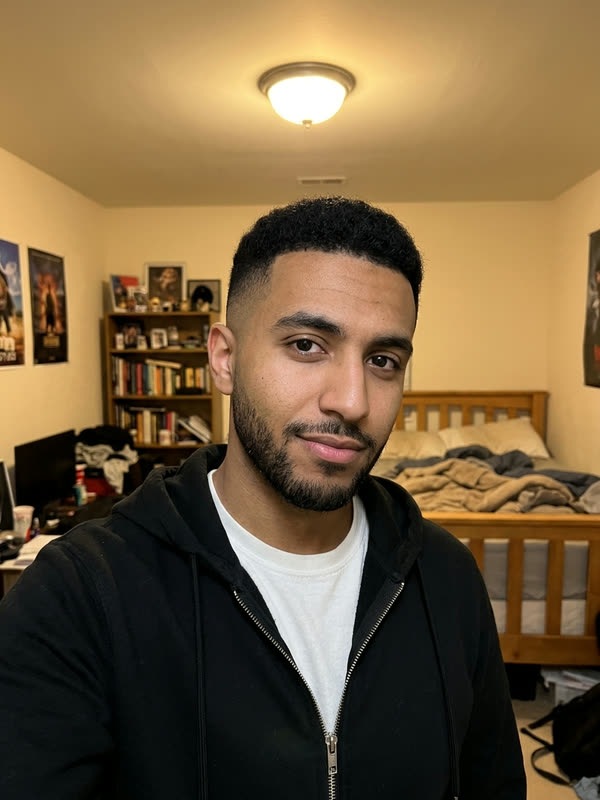

Sample input photos are AI-generated stand-ins, not customer photos. The videos are unedited output.
Who should star in it?
- 01
Payday you
Post it the day the salary lands.
- 02
Your dad
The man who checks every receipt, suddenly fanning hundreds.
- 03
The broke friend
The one who still owes you twenty.
- 04
The boss
Office party material, with their blessing.
The trend · Oct 2026 · TikTok
What is the Money Spread AI trend?
A TikTok format from October 2026 that plays on the money spread meme: someone in a bedroom shows off a brick of cash, lets a stack cascade down and finishes by fanning the bills out in front of their face with a straight, smug look.
The joke is the flex nobody believes: your broke friend, your dad, you on payday. On EffectReel it takes one photo and the same credit as every other effect, so the same selfie can do this and the rest of the catalog.
How to make it
Add a money spread sound
- 1
Add one photo
Upload a clear photo of one person above: a front-camera selfie is all it takes. No account needed.
- 2
Pay once
Pick a pack and check out. Usually ready in about 10–20 minutes, always within the hour; we email you the link.
- 3
Download
Save the 15 s · vertical 9:16 · silent MP4.
- 4
Add the sound and post
Tap Add sound and search "money spread" — the trending sounds are short, beat-led tracks. Line the beat drop up with the fan opening at about 10 seconds.
Pay once. Use on any effect.
One-time packs, no subscription. Credits never expire and work on every effect — a failed video gives its credit back.
- One-time payment · No subscription
- Credits work on every effect and never expire
- Failed generations automatically return your credit
- No watermark
Money Spread AI, answered
What is a Money Spread AI video?
The October 2026 TikTok trend where someone flexes a brick of cash, lets the bills cascade and fans them out in front of their face. Upload one photo and that person does the whole 15-second clip.
Do I need a prompt?
No. There's nothing to write: the cash, the bedroom, the moves and the timing come with the effect. You only add one photo.
Do I need real cash or a special photo?
Neither. An everyday front-camera selfie works; the stacks of bills, the cascade and the fan are all in the video you get.
Does it keep my beard, glasses and clothes?
Yes — face, hair, beard and your top carry over from the photo, like the hoodie in the first sample. Take sunglasses off so your eyes show.
Can I make it of someone else?
Yes, with their okay: a photo of your dad, a friend or a coworker works the same way. Use photos of real people only with their permission.
What photo works best?
One person, face clearly visible and facing the camera, in good light. Waist-up or full-body photos carry the outfit best; a selfie works too. Avoid group photos, sunglasses and heavy filters.
How long does it take?
Usually ready in about 10–20 minutes, always within the hour. You can close the page — we email you the link when it's ready.
How much does it cost? Is it free?
It isn't free: $9.99 for one video, $19.99 for three or $59.99 for ten. One-time payment, no subscription. Credits never expire, work on every effect, and a failed video returns its credit automatically.
Does the video come with the song?
No. Every video is a silent HD MP4 without a watermark, so the app's sound never fights it and nothing gets muted. Each effect page shows which trend sound to add and where the beat should land.
What if I don't like my video?
Tap "Needs work" on the result page and tell us what's off — a real person reads every one and replies by email. If a video fails to generate at all, its credit comes back on its own.
Can I use someone else's photo?
Only with their permission. Making a video of a friend for a laugh is the point — but don't use a stranger's or a celebrity's photo, and don't present the video as real footage.
More trends, same photo
All effects →9 s · 9:16
Bby Wow Guy AI
Strut up through a quinceañera, bite the pan dulce, stare down the lens, dance away.
16 s · 9:16
Hotel Lobby AI
Two of you at the hanging mic: one raps every bar, the other hypes, turns and meets them face to face.
15 s · 16:9
Crazy Frog AI
Ride an invisible motorbike down a future highway with a hover-bike cop on your tail.
20.7 s · 9:16
Fergie Baby AI
Push through the park gate and rap the whole walk straight down the lens.
9.4 s · 9:16
Check One Check Two AI
Shove your face into the lens on a night street and spit the bars like you mean it.